
SQL Log Shipping Service
Automated SQL Server log restores
SQL Log Shipping Service is a free, open-source tool that automatically restores SQL Server transaction log backups. It runs as a Windows service and is developed in the open on GitHub under Trimble’s open-source program.
It’s a good fit for anyone setting up log shipping or needing a reliable way to restore databases from backups. It’s especially useful when you have a large number of databases, or back up to URL, where the built-in options are limited.
Features
- Simple config based setup. There’s no per-database setup, which makes it very effective for large numbers of databases.
- Automatic initialization of new databases. New databases are picked up without any manual intervention, either from full/diff backup paths or from a connection string to the primary server.
- UNC path or URL. Restore from a standard file share such as
\\server\share, an Azure Blob container or an S3 bucket. - Scalable. A configurable number of threads processes restores, so your instance isn’t overloaded with a job per database or held back by a single job. It scales to thousands of databases.
- Standby mode support. Let users query your log shipped databases. Open connections can be killed after a period of time so they don’t block restores, and databases can be kept available for querying during set hours. Standby is only applied after the last log is restored, which is more efficient than built-in log shipping.
- Disaster recovery. Beyond log shipping, it can be part of your disaster recovery strategy for restoring databases from backup.
How it works
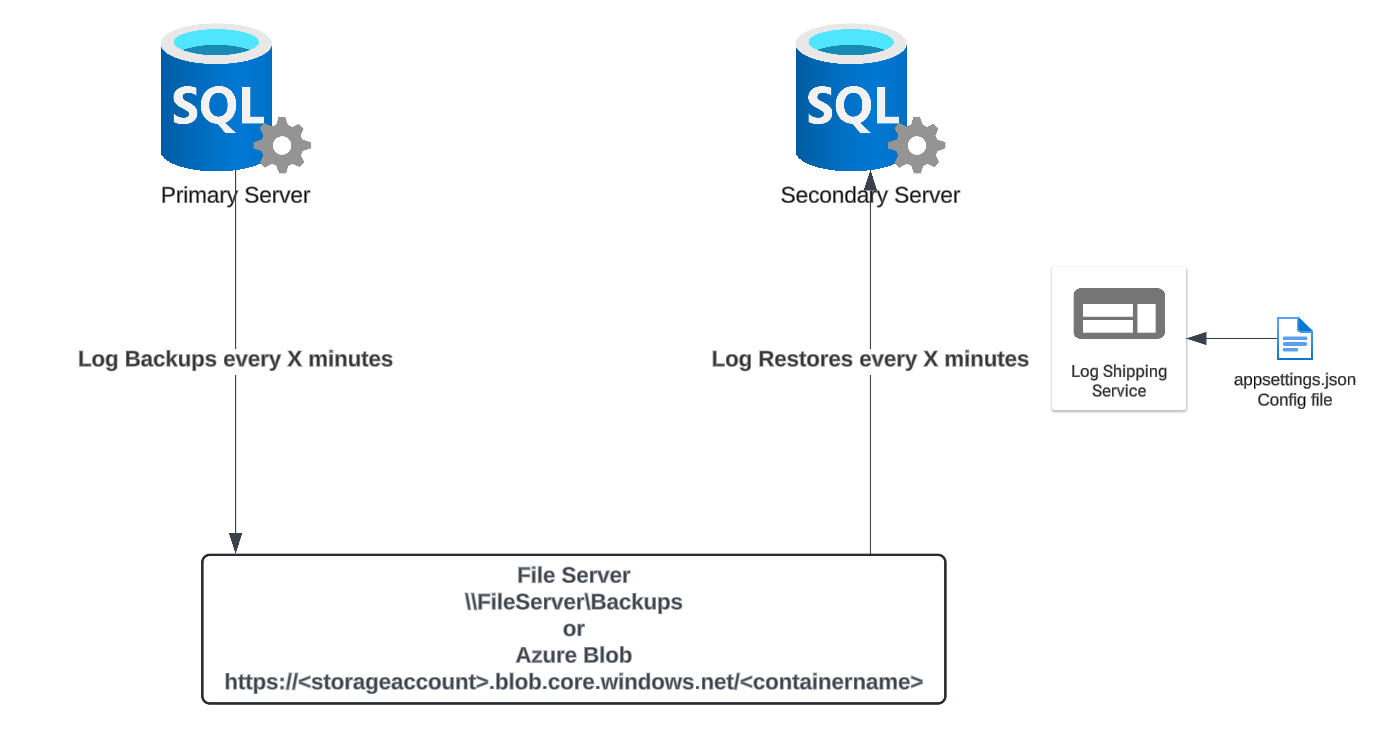
The service is configured with an appsettings.json file and runs log restores on a schedule. On each run it finds the databases in a restoring or standby state on the destination server, lists the new log backups for each one, checks the restore headers and restores the right files, working through databases in parallel.
It only handles restores, so it pairs with a backup solution such as Ola Hallengren’s maintenance solution, which supports parallel backups and backup to URL.
Learn more
- Quick Start: get up and running
- Wiki: documentation for every feature
- GitHub: source code, releases and issues